

Architecture
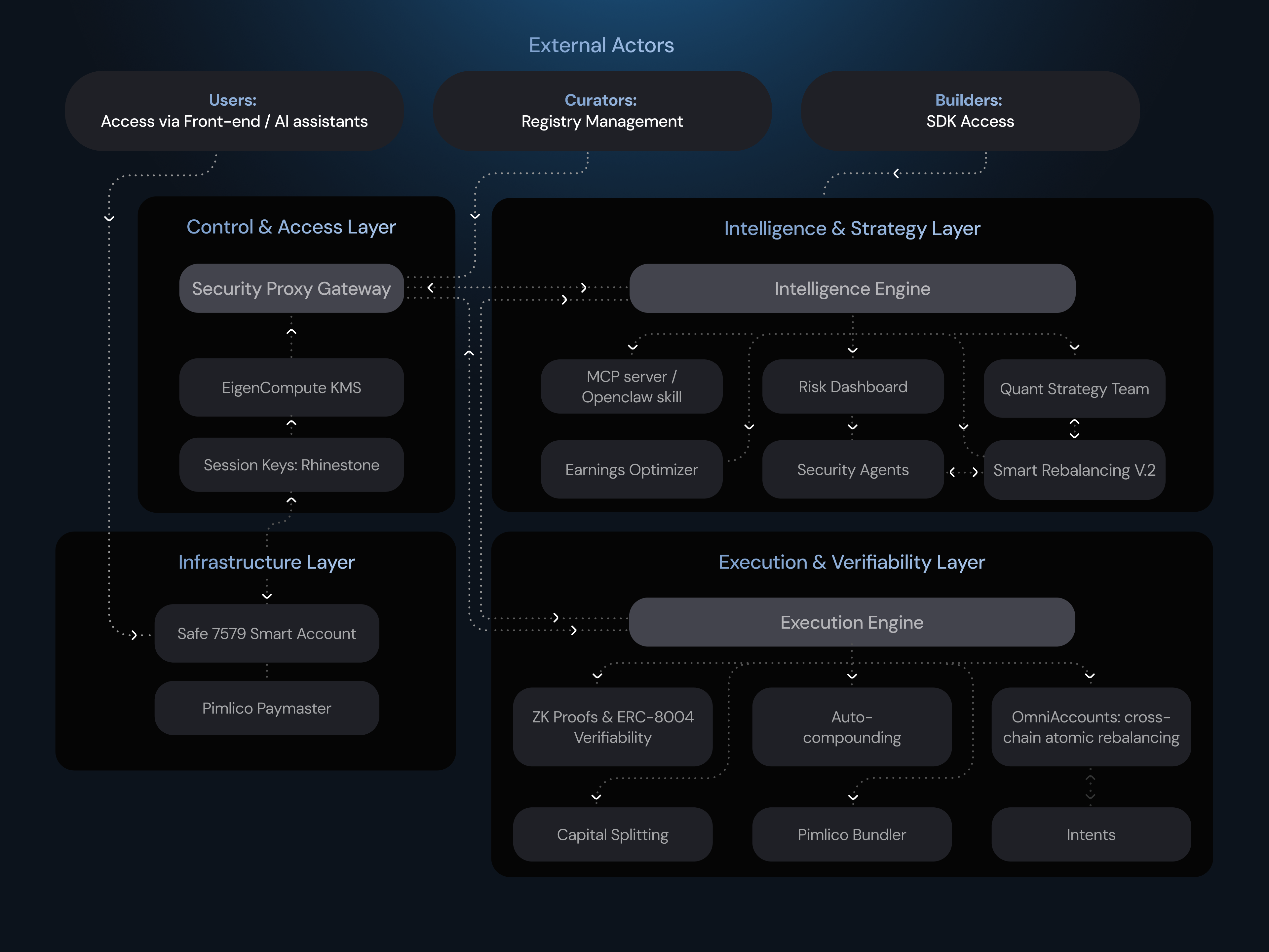
Zyfai is structured as a four-layer stack, each with a distinct responsibility:- Infrastructure Layer: Account Abstraction foundation
- Control & Access Layer: permission enforcement
- Intelligence & Strategy Layer: strategy formation, risk analysis, and market monitoring
- Execution & Verifiability Layer: onchain execution, rebalancing validation, and cross-chain settlement
- Users access Zyfai through the zyf.ai front-end or AI assistants such as OpenClaw
- Curators manage target registries of approved protocols and pools in the Security Proxy Gateway
- Builders integrate the agentic yield stack into their own products via the SDK or MCP Server
Infrastructure Layer
Every Zyfai user receives their own Safe7579 Smart Account: a self-custodial smart contract wallet built on Safe and made modular through the ERC-7579 standard. This is the container for all user capital. No shared vaults, no pooled funds. The user’s EOA remains the sole owner. All gas fees are covered by the Pimlico Paymaster, so users never need to hold native tokens. Account deployment, rebalancing, auto-compounding, and every other Agent action is gasless for the end user. This layer is the foundation everything else builds on. Without self-custodial, gas-abstracted smart accounts, autonomous Agent execution is not possible.Control & Access Layer
Once the account exists, the next question is: what is the Agent allowed to do? The Security Proxy Gateway answers this. It is an onchain enforcement framework that validates every Agent transaction at three levels: contract address, function selector, and calldata parameters. Transactions are checked against a curator-managed registry of approved targets. Anything outside the registry is rejected, regardless of what the Agent requests. Permissions are granted via Session Keys. A user signs a single Session Key during onboarding, scoped to a specific curator registry. No re-signing is needed when new pools are added. Session Key signing is hardened through EigenCompute KMS, which isolates execution inside a Trusted Execution Environment (TEE). No operator, including Zyfai, can access it.The flow:
Intelligence & Strategy Layer
With permissions defined and enforced, the Intelligence Engine decides when and where to move capital. Smart Rebalancing v.2 is the core decision engine. It continuously evaluates yield opportunities across all supported chains and protocols. Every potential rebalance must pass multiple safety checks before it is forwarded for execution. The Intelligence Engine is supported by several components:- Quant Strategy Team: develops and maintains the scoring models, risk parameters, and allocation logic that the engine operates on.
- Security Agents: monitor integrated protocols for anomalies, exploits, and liquidity events. If a protocol triggers a risk flag, the Agent can exit positions proactively.
- Risk Dashboard (risk.zyf.ai): provides real-time visibility into pool risk scores, protocol exposure, and the Session Key Registry.
- Earnings Optimizer: a proprietary algorithmic system that calculates and optimizes yield. It supports partial withdrawals, a feature rarely found in comparable products, and powers Capital Splitting feature.
- MCP Server / OpenClaw Skill: exposes the Intelligence Layer’s data to external AI agents and tools, enabling Agent-to-Agent commerce through standardized interfaces.
Execution & Verifiability Layer
The Execution Engine takes validated strategy decisions and settles them onchain. The engine coordinates several execution mechanisms depending on the action:- Pimlico Bundler: bundles and relays ERC-4337 user operations for onchain execution.
- Auto-compounding: when reward tokens reach the $2 threshold, they are automatically claimed, swapped to USDC / EURC / ETH / BTC, and reinvested into the active position.
- Capital Splitting: for portfolios of $10,000 or more, the engine distributes capital proportionally across multiple pools based on wallet weight, simulated post-deposit APY, and pool capacity constraints.
- OmniAccounts: enables cross-chain atomic rebalancing, powered by an intents-based messaging architecture.
- Intents: the underlying settlement mechanism for cross-chain execution, ensuring transactions are deterministic, atomic, and MEV-protected.
How It All Connects
A simplified end-to-end flow:- A user deposits USDC. The Infrastructure Layer deploys a Safe7579 Smart Account (if new) and the Paymaster covers gas.
- The user selects a strategy and signs a Session Key. The Control & Access Layer scopes this key to the selected curator registry.
- The Intelligence & Strategy Layer continuously monitors markets. When it identifies a yield improvement that passes all five rebalancing checks, it generates an allocation decision.
- The Execution & Verifiability Layer validates the transaction against the Security Proxy Gateway and settles it onchain. If cross-chain, OmniAccounts handles atomic settlement via intents.
- A ZK proof is generated and anchored in the ERC-8004 registry, proving the action followed its deterministic rules.
For detailed documentation on each component, navigate to the relevant layer section in the sidebar.